Status
The status and the Done checkbox record how far work on a file has got. Everyone who can see the folder sees the same state.
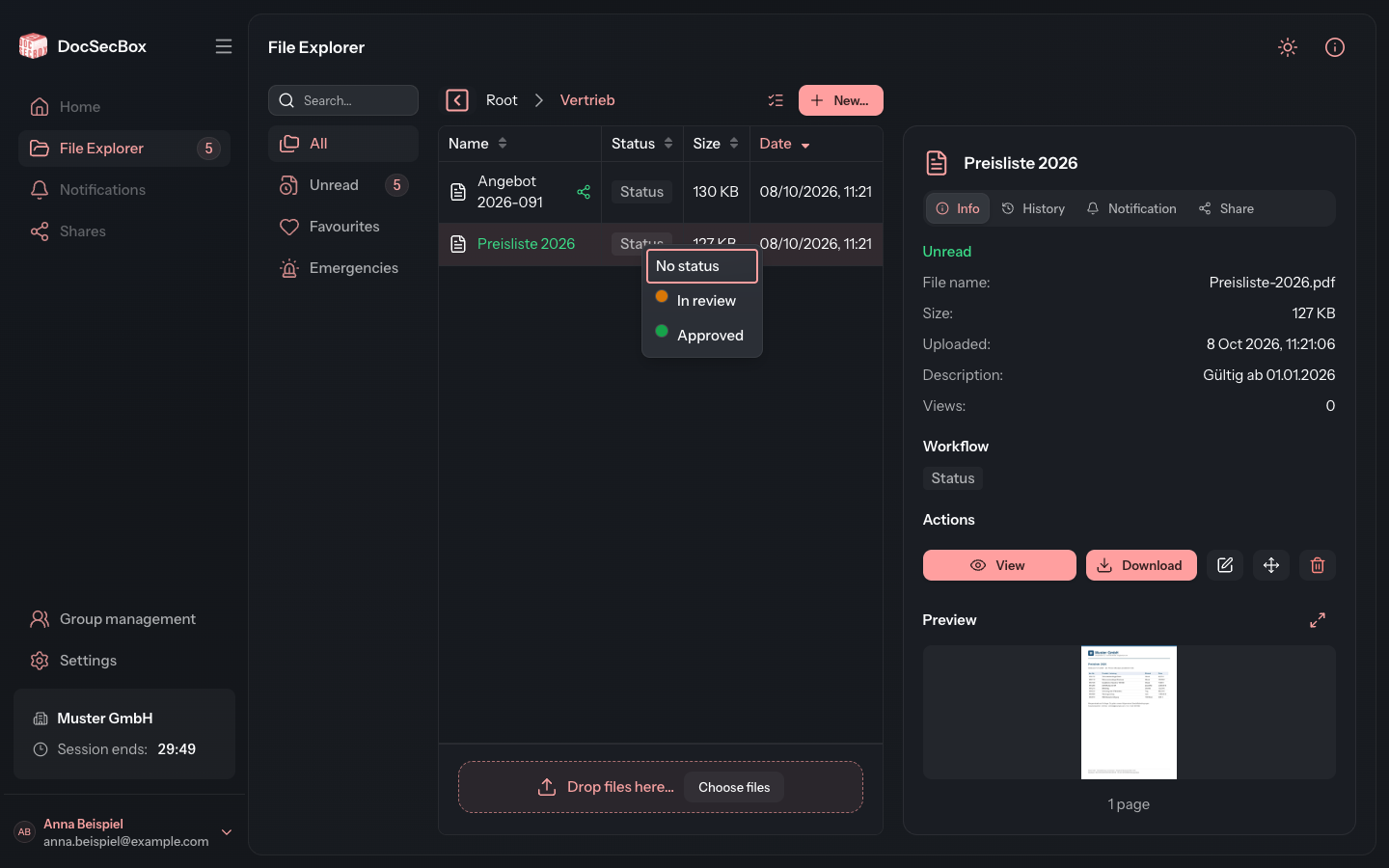
There are two tools, which a folder can offer separately or together:
| Tool | What it is |
|---|---|
| Done | A simple checkbox: finished or not finished |
| Status | A coloured label from a list kept by the folder, for example "Awaiting reply" |
You find both in two places: in the Status column of the list and in the file's Info tab, in the Workflow block.
Setting a status
- Click the file's status button, in the Status column or in the Workflow block. If the file has no status yet, the button reads Status.
- Choose an entry from the list.
The DocSecBox saves the status immediately. No status removes it again.
Anyone who may edit the file can change its status. For everyone else the button is greyed out.
Marking as done
- Select the Done checkbox in the Workflow block. Or select the checkbox in the Status column.
- To take it back, clear the checkbox again.
The checkbox is saved immediately too. Move the mouse over it to see who ticked it and when.
Several files at once
- Click Select several in the path bar and select the files.
- Below the Actions in the detail panel are the Done checkbox and the status button.
- Tick the checkbox or choose a status. It applies to all selected files.
If the files have different statuses, the button shows Mixed. You can only set a status for several files if they are all in the same folder. Otherwise the button is greyed out with the hint Only possible when all files are in the same folder.
When Status or Done is missing
The folder decides whether the two tools appear:
- Status appears as soon as the folder offers a list of statuses. That list is kept by whoever may manage the folder, see Status templates.
- Done needs two things: Enable the “Done” column is switched on in the folder (see Folder details), and your group grants the column in the Members tab.
If one of these is missing for you, ask your administrator.
Good to know
- Status and identifier are different things. The status shows the progress of work. The identifier is free text for searching and grouping, which you enter when editing the file.
- Every change is recorded. Who set which status and when is shown in the file's history.
- Mark as read in the multiple selection has nothing to do with the status. It only affects whether files count as unread, see Filters.