Privacy
Here you store your company's legal texts: the contact details of the supervisory authority, the privacy text and the GDPR info. The DocSecBox shows them in the help menu, in the GDPR report and, if you wish, in mails.
Administrators only
Only administrators see this page. If Only super administrators are allowed to adjust program settings is switched on under Roles, only super administrators see it.
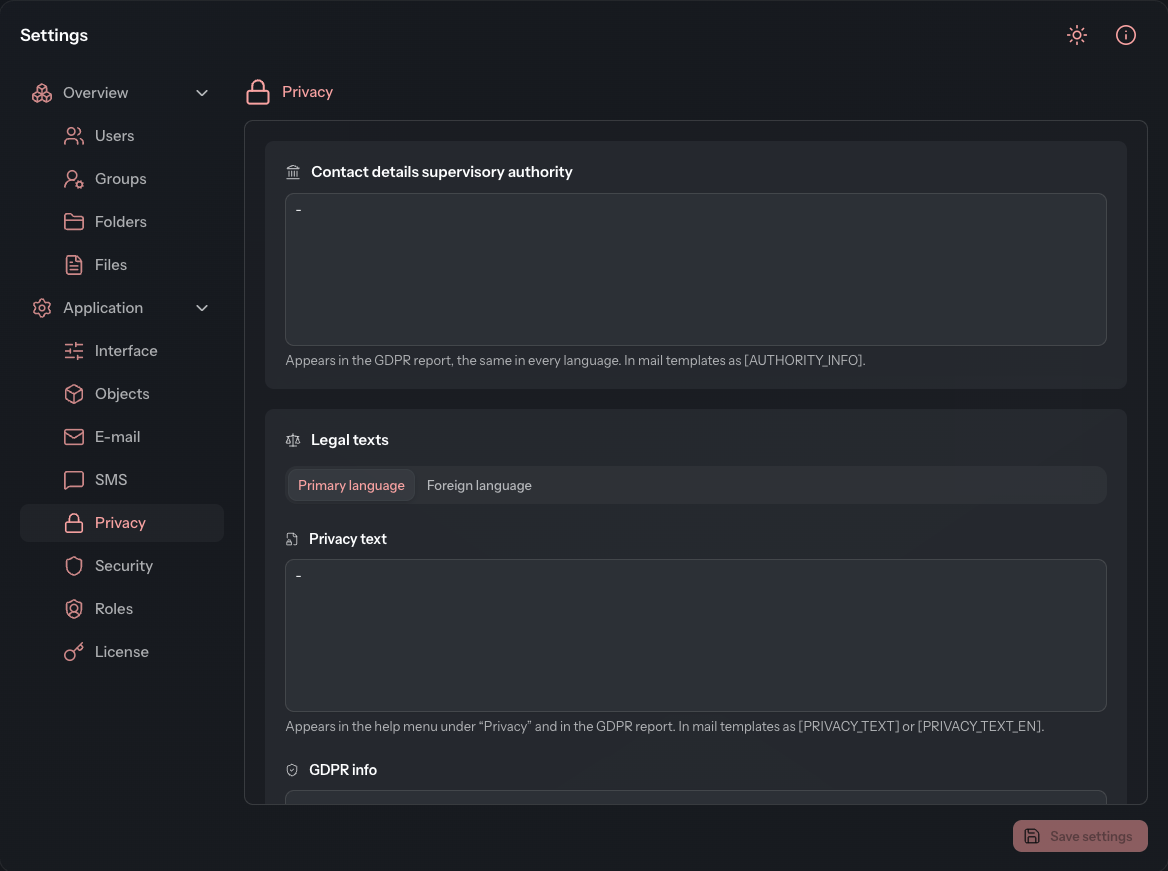
Enter the legal texts
- Open Settings › Application › Privacy.
- Enter the Contact details supervisory authority.
- In the Legal texts card, select the Primary language tab and enter the Privacy text and the GDPR info.
- Switch to the Foreign language tab and enter the same texts in the second language.
- Click Save settings.
You set which language is the primary one under Interface. The foreign language is any other language, not necessarily English.
Where the texts appear
| Text | Appears | Placeholder in mail texts |
|---|---|---|
| Contact details supervisory authority | in the GDPR report, the same in every language | [AUTHORITY_INFO] |
| Privacy text | in the help menu under Privacy and in the GDPR report | [PRIVACY_TEXT] (primary language), [PRIVACY_TEXT_EN] (foreign language) |
| GDPR info | in the GDPR report | [GDPR_INFO] (primary language), [GDPR_INFO_EN] (foreign language) |
The contact details of the supervisory authority exist only once and apply to both languages. How to insert a placeholder into a mail text is described under E-mail.